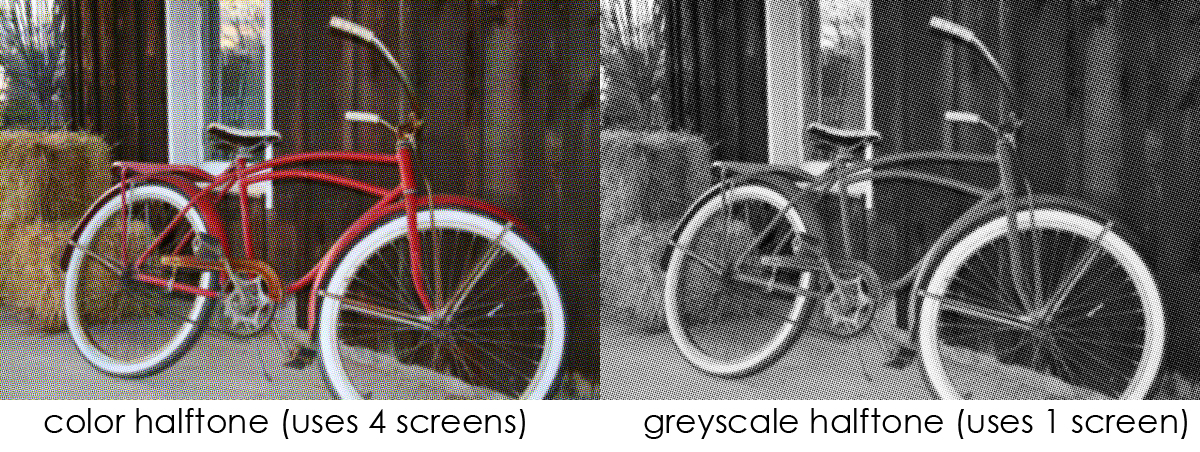
In silkscreen printing you need to have a solid black image on your film positive to properly expose your stencil with photographic emulsion. If your image requires solid blocks of colour and no gradients or shading then it’s no problem. But if your image is more photographic or has significant gradients and varying tone then you have a problem. When you turn your image to black and white for your film positive you will have significant amounts of grey image area which will not properly expose. So, the best way to screen print photo style images is to use a halftone pattern.
 A
halftone pattern is a series of dots that vary in
size and shape and spacing to create an
optical illusion of varying tones and gradients. The
dots are so small that the human eye blends them
together so they appear as smooth tones.
A
halftone pattern is a series of dots that vary in
size and shape and spacing to create an
optical illusion of varying tones and gradients. The
dots are so small that the human eye blends them
together so they appear as smooth tones.
Creating your halftone image will require some digital manipulation. Adobe photoshop has a number of filters to reproduce your image in a haltone pattern that you can use for your film positive. (filters<pixelate<color halftone, filters<sketch<halftone pattern, mode<grayscale<bitmap). I have had great success using photoshop for producing halftone images. Here’s a more detailed tutorial about using photoshop for your halftone printing.
Or you can use Ben-Day Dots, which are sheets of dots comic book illustrators used to create secondary colors and shading that would combine two (or more) different small, coloured dots to create a third colour. They would be purchased in sheets of transfers and then applied to the needed areas.
My best advice for printing halftones is to experiment first with the size of the dots you will be able to print. But the general rule of thumb for determining correct mesh count to use is 3.5 x halftone line count to get the minimum mesh count. For example, a 65-line halftone image would require a 230-thread/in. mesh or higher. The higher the mesh count, the better the reproduction of the image on the stencil and the print and the less chance of moiré patterns. Avoid any directly divisible mesh/halftone combinations (e.g., 75 line halftone screen on a 300-thread/in. mesh) as this will also cause interference patterns on the stencil and the print. Also keep in mind that yellow mesh is often recommended for high resolution printing with halftones.
Halftone screens up to 32 lines/in. 110
Halftone screens up to 70 lines/in. 305–380
Halftone screens from 70-133 lines/in. 380 –420
Happy Printing!